President's Day Word Search: A Fun Way to Learn About U.S. History
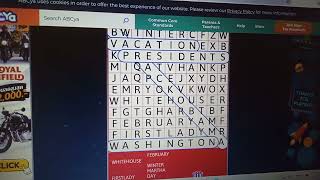
President's Day offers a perfect opportunity to combine celebration with education. While many families enjoy a long weekend, teachers and parents often look for engaging activities that reinforce what students learn about the nation’s leaders. A President Day Word Search provides exactly that blend of fun and factual review. By hunting for names, titles, and key terms hidden in a grid, children practice spelling, improve visual scanning skills, and deepen their familiarity with American history—all without feeling like they are doing “work.”
What Is President's Day?
Officially observed on the third Monday of February, President's Day honors the birthdays of George Washington and Abraham Lincoln, two of the most influential figures in United States history. Over time, the holiday has expanded to recognize all individuals who have served as president. Schools frequently use the day to discuss the responsibilities of the executive branch, the evolution of the presidency, and the ways presidents have shaped national policy.
Because the holiday falls mid‑winter, it also serves as a convenient break in the school calendar. Teachers can leverage this pause to introduce supplemental activities that reinforce curriculum goals while keeping students motivated.
Why Use a Word Search?
Word searches are more than simple pastimes; they support several cognitive skills:
- Pattern recognition: Scanning for letter sequences sharpens the ability to spot familiar patterns.
- Vocabulary reinforcement: Repeated exposure to terms such as “inauguration,” “veto,” or “cabinet” helps cement their meanings.
- Spelling practice: Locating each word correctly reinforces accurate spelling.
- Focus and perseverance: Completing a puzzle requires sustained attention, a valuable trait for any learning task.
When the theme ties directly to a holiday like President's Day, the activity becomes a contextual review rather than an isolated exercise. Students connect the words they find to the stories and facts discussed in class, creating a richer learning experience.
How to Create Your Own President's Day Word Search
Designing a custom puzzle is straightforward and allows you to tailor difficulty to your audience. Follow these steps:
- Choose a word list: Select terms that reflect the holiday’s focus. Include presidents’ names, important dates, governmental vocabulary, and symbols associated with the office.
- Determine grid size: For younger learners, a 10×10 or 12×12